
Why modeling in SAP BW/4HANA
Before discussing integration topics let us quickly review the benefits of SAP BW/4HANA and why is it important to have it as an EDW (enterprise data warehousing) platform. One of the first things that come to mind is SAP’s Business Content which is available when connecting to SAP ECC systems in the form of extractors and data sources, and to SAP S/4HANA in the form of CDS views. Business Content allows mapping complex data structures to recognizable business semantics in a relatively easy way and supports this mapping with SAP system upgrades and new releases.
Besides Business Content SAP BW/4HANA has the following capabilities available out of the box that make it stand out from other EDW solutions used for corporate reporting and planning:
- Powerful master data capabilities (attributes, texts, hierarchies, authorizations, aggregations, Currency/UoM)
- Graphic Data Modelling Capabilities (data flows, layers)
- Virtual Modelling, Joins/Unions (Composite Providers)
- ETL/ELT (Complex Transformations)
- Jobs Scheduling/Monitoring (Process Chains)
- Inventory/Stock Management (Non-cumulative Models)
- Currency Translations/Unit Conversions
- Users/Authorizations/Security (Analysis Authorizations)
- AI/ML Capabilities (R/Python)
- Structured Financial Reports/P&Ls/YTD, etc. (BW Queries)
- Business Planning and Consolidation capabilities (BPC/IP)
- Transport Mechanism (approval cycle, reviews, distributed development, tests, deployments)
- Multi-temperature data storage (hot, warm, cold)- 4TB HANA license -> 12TB EDW
For more information on SAP BW/4HANA please check the following white paper: An Overview of SAP BW/4HANA and Key Considerations When Making the Decision to Migrate
The Challenge of Integrating SAP and non-SAP Technologies
SAP native BI frontends such as SAC, AFO, and BO are more tightly integrated with SAP applications such as SAP S/4HANA and SAP BW/4HANA. SAP is usually using a BICS protocol for connectivity to ensure the best query performance and compatibility in functionality. This way queries on large datasets are performing well, and most backend design capabilities are directly supported.
However, some organizations or user groups due to various reasons have a preference for non-SAP frontends, e.g. MS Power BI, MicroStrategy, Qlik, and Tableau. Connecting SAP and non-SAP tools is technically possible, but there are a number of challenges.
Some of the integration challenges are listed below:
- Additional infrastructure to be acquired and supported (firewalls, gateways, etc.)
- Additional product licenses may be needed (e.g. Premium capacity for Power BI)
- Activities related to users/roles maintenance on multiple platforms
- More complex approach toward system development, testing, and transports
- Additional development/support activities in order to ensure backend/frontend compatibility
Available Connectors for Power BI
As of June 2018 Power BI Desktop can use SAP BW connector Implementation 2.0 developed by Microsoft that has improvements in performance and capabilities. More information on SAP BW Connector can be found here.
Alternatively, HANA DB Connector details can be found here.
In the case of SAP S/4HANA, CDS views can be imported to Power BI as an OData service, or by generating a Calculation view for the CDS view and consuming it via the HANA DB connector.
Below is an overview of available connection options between SAP applications and MS Power BI:

Both Direct Query and Import connection types have their own pros and cons. In general, Import connection allows using more native features in Power BI than Direct Query. However, in order to import large datasets (over 1GB) you need to purchase and maintain Premium capacity in Power BI. Also, in order to import/refresh datasets frequently Premium capacity is a must.
Technical Limitations and Possible Workarounds
A number of standard SAP BW capabilities are not directly supported by connectors or supported with limitations: number/text formatting, user exit variables, different types of input parameters (select option, ranges, etc.), hierarchies, BW query structures, navigational attributes, unit/currency conversions, analysis authorizations.
BW Connector (MDX)
General information on connecting SAP BW to Power BI:
https://docs.microsoft.com/en-us/power-bi/connect-data/desktop-sap-bw-connector
Direct Query Mode
The official list of limitations to keep in mind when exposing BW models to Power BI using Direct Query:
https://docs.microsoft.com/en-us/power-bi/connect-data/desktop-directquery-sap-bw
HANA DB Connector (ODBC)
BW Model to HANA view limitations
There is a number of limitations related to exposing SAP BW/4HANA models to HANA views. Not all BW objects properties can be added to the generated SAP HANA views:
HANA view to Power BI limitations
Connecting Power BI to HANA views also has certain limitations:
https://docs.microsoft.com/en-us/power-bi/connect-data/desktop-sap-hana
And specific limitations in Direct Query:
https://docs.microsoft.com/en-us/power-bi/connect-data/desktop-directquery-sap-hana
The following tips may be useful for addressing typical limitations between SAP BW and Power BI:
| Feature with Limitation | Possible Workaround |
| BW Authorizations are not supported in the import mode or with HANA DB Connector | Configure row level security (RLS) in Power BI directly |
| Currency/Unit conversions | Import conversion tables to Power BI models, define conversion rules in DAX |
| BW query structures not supported | Design structures natively in Power BI |
| BW hierarchies | Recreate hierarchies in Power BI |
| Customer exit variables | Use modelling features of Power BI instead |
| Characteristic attributes | Expose needed attributes in Composite providers or HANA views as fields |
SAP’s hybrid approach involving SAP Data Warehouse Cloud (Datasphere in BDC)
According to recent communications by the SAP development team during SAP TechEd 2020, besides providing self-service data modeling capabilities a new cloud data warehousing product (SDWC/Datasphere) can serve as an intermediate layer for connecting SAP BW to 3rd party BI tools, such as Power BI, and for exposing data models via APIs:
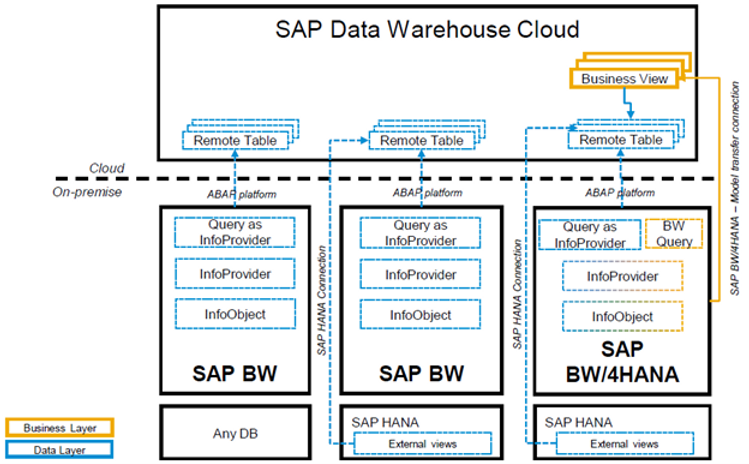
Having an SDWC layer in the architecture may require data replication to the cloud. And certain crucial functionality (e.g. business semantics integration with SAP BW/4HANA) is expected to be available in the future releases of the SAP Data Warehouse cloud.
Final Words
Despite numerous limitations it is possible connecting SAP applications (including SAP S/4HANA and SAP BW/4HANA) to MS Power BI. Existing Power BI users may benefit from a familiar self-service BI tool and its powerful capabilities. Each scenario requires thorough analysis though, whether the benefits of such integration outweigh the drawbacks and limitations associated with it. We should also keep in mind that certain scenarios may require Power BI Premium capacity licenses in order to accommodate larger datasets, more frequent refreshes, transport capabilities, etc.
The following indicators serve in favor of the Power BI frontend on top of SAP applications:
- Data volumes are not huge
- Authorizations requirements are rather simple and can be designed using workspaces and RLS
- Users already have good skills and knowledge of Power BI
- Complex structured reports on large datasets are not required in real-time
- Business planning and consolidation are not in the scope
On the other hand, when we are dealing with large SAP-originated datasets, real-time analytics, structured reports based on hierarchies, business planning, and consolidation requirements, native SAP BI frontends, such as SAP Analytics Cloud and Analysis for Office, may be considered as well.